
Acquia DAM is a digital asset management solution that is part of the Acquia Digital Experience Platform (DXP), and also available as a standalone product. It helps enterprise businesses manage their brand files more effectively, thanks to features like:
- Digital asset management
- File sharing
- Search functionality
- AI-powered workflows
- Integrations with communication, creative, and project management tools.
Acquia DAM is a popular choice for enterprise companies that are already using other tools in the Acquia ecosystem, like the Drupal CMS. But it isn’t the only tool available for managing digital files. Let’s look at Acquia DAM, and some other top-rated DAM products you could consider as an alternative.
How Acquia falls short as a DAM solution
Many companies are happy with Acquia DAM as their asset management platform, as you’ll see from their largely positive G2 reviews. But there are several topics that users often mention as disadvantages to the product in their reviews:
- Integration issues: Some users feel the integrations with other tools are limited. One reviewer said, “Acquia relies on a network of partners for integrations with other systems. Development of specific integrations can lag and don't always align with our technology stack.”
- Missing or limited features: Some customers feel the Acquia DAM is missing key features they’d expect from a digital asset management platform, and that the product quality has been declining in recent years. One user said, “The services offered for the DAM have not been up to par with other DAM offerings.” Another shared, “A lot of features that seem like they would be standard are not available.”
- Outdated user interface: Some users feel the platform is outdated compared to other DAM solutions. One reviewer shared, “The DAM is feeling more and more dated. Both controls on the admin side, as well as the day to day user experience feels like a legacy enterprise system rather than a powerful new tool that is the future.”
- Poor customer support: Some users feel the quality of support has declined, especially since Widen was acquired by Acquia. One reviewer said they experienced, “More and more technical issues and outages. Declining service. Dismissive and unhelpful during offboarding.” Another shared, “While I am happy with Widen since the merge of Acquia, customer service has went downhill.”
Additional costs and price increases: Some users report having to pay extra for additional features, and feel the platform is very expensive. One user shared, “Since Acquia acquired Widen Collective, costs have risen more rapidly. I’ve seen higher-than-expected rate increases,” while another said, “Setup fees are usually required to configure new applications within the system or when adding integrations; these are one-time fees but do require additional budget.”
Best Acquia DAM alternatives for AI-powered asset management solutions
Whether you’re unhappy with Acquia DAM as your DAM solution and looking for an alternative, or you’re comparing digital asset management software for the first time, here are eight products to consider.
1. Frontify
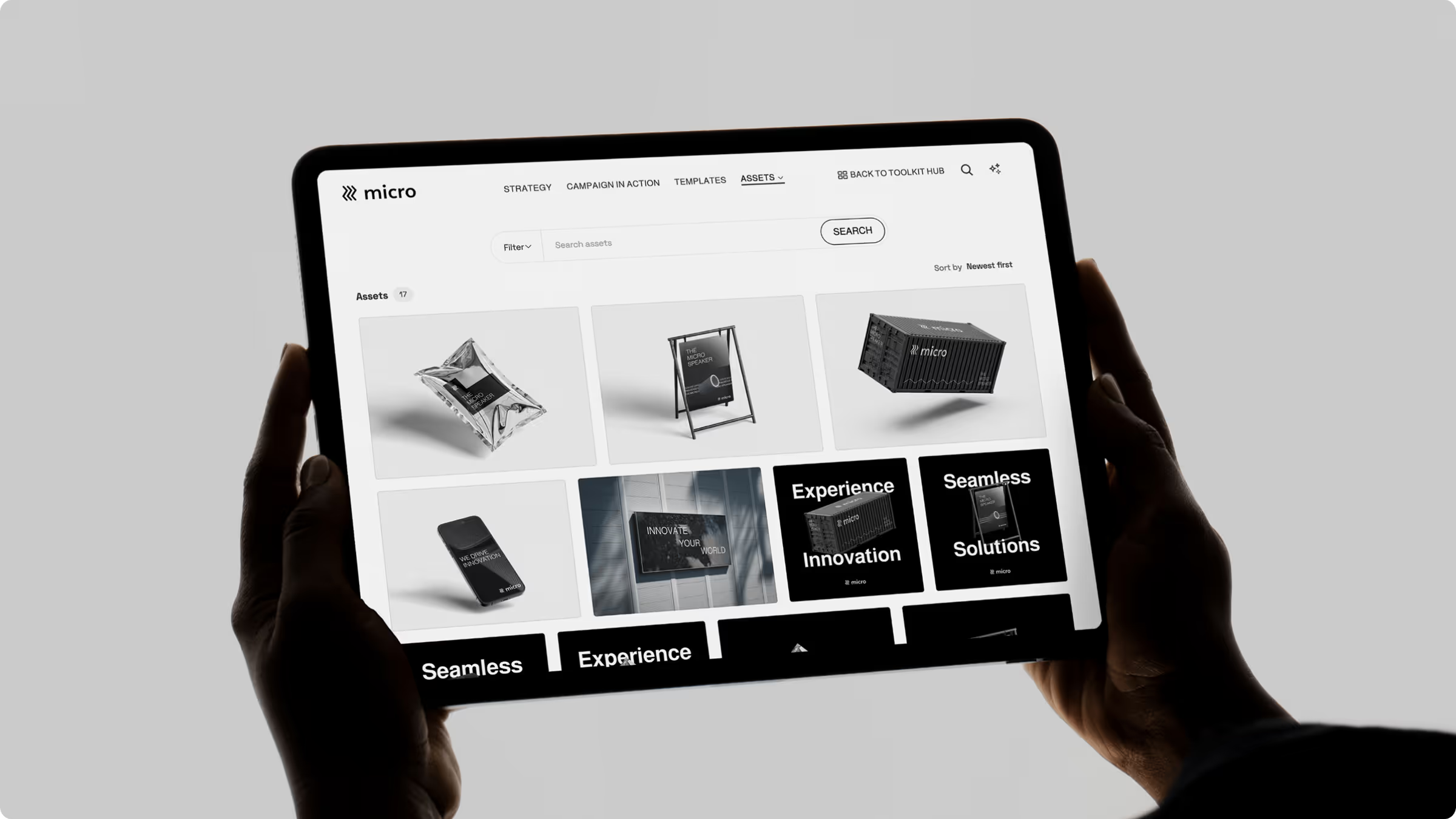
Frontify is a comprehensive brand management solution for mid-sized and enterprise organizations. It offers a centralized environment for building, managing, and scaling brand operations. The platform provides an intuitive digital asset management (DAM) system with cloud-based brand guidelines, customizable templates, AI-enhanced tools, and brand portals — all designed to support consistent brand execution across all teams and locations.
Top features
Frontify helps companies store, organize, and manage their brand assets and digital media files. Its top features include:
- Holistic brand management ecosystem
- Centralized digital asset management
- Interactive, online brand guidelines
- Customizable templates for print and digital materials
- AI-powered search functionality
- AI-driven insights for analytics to enhance asset discovery and utilization
- Smart content tagging and asset organization
- Customizable user permissions and access controls
- Multi-brand setup
- Enterprise-grade security
- Seamless integration with numerous third-party apps and tools
Pros & cons
Like Acquia, Frontify has lots of positive reviews on G2. Customers mention several features that they love:
- A clean, intuitive user experience (ranked #1 in usability by enterprise users on G2)
- Centralized control over brand assets and materials
- Powerful AI features that streamline asset management
- Excellent customer support and onboarding resources
“Frontify’s platform is far and away the best tool I’ve worked with.” - Creative Director, Caribou Coffee
However, there are also a few areas where customers feel the platform could be improved:
- Some users report a steep learning curve at first, though the platform becomes intuitive with use
- Some initial customization may be needed for companies with specific or complex requirements
- Some users don’t need the full brand platform functionality and would be better suited to a more basic DAM.
Benefits for enterprise & global brands
Frontify’s comprehensive platform is a popular choice for enterprise businesses. By combining digital asset organization, creative collaboration, and brand management in one product, it provides one single source of truth where enterprise or global teams can find everything brand-related.
Frontify’s main benefits for enterprise companies include:
- Centralized access to brand assets: A single source of truth for all brand files, helping eliminate disconnected tools and storage silos.
- Support for multi-brand or multi-team structures: Manage several brands or departments under one system, with customizable access for different teams to maintain brand consistency.
- Dynamic brand guidelines: Frontify’s live, online guidelines update in real-time, making it easy to ensure brand alignment globally.
- Scalable, brand-compliant templates: Speed up content creation with customizable templates that have lockable design elements to improve brand consistency.
- AI-enhanced tools: Intelligent search, auto-tagging, and AI-supported metadata creation help teams create and locate assets faster and more effectively.
- Advanced user access control: Set and tailor specific permissions for internal team members and external collaborators to streamline collaboration while protecting brand integrity.
- Highly customizable platform: From design to structure, users can tailor their brand portal to reflect their brand identity and business needs. The Brand SDK offers developers even greater control over design and functionality.
- Enterprise-grade compliance and security: Built to support organizations with rigorous security needs, including features like SSO and compliance with major standards such as GDPR and HIPAA.
“Frontify is a proven ROI solution. Every end user can find key assets quickly and self-serve more autonomously.” - Head of Corporate Identity & Design, Nestlé
2. Bynder
Bynder is a popular DAM provider used by global and mid-market businesses. It’s another option for companies looking to manage their digital assets more effectively.
Top features
Bynder offers a range of features including:
- Digital asset management
- Pre-built templates for branded assets
- Workflows to streamline collaboration
- AI capabilities to boost search accuracy and content discoverability
- Analytics data on asset and guidelines usage
- Integrations with other brand-building tools
Pros & cons
Bynder is a popular DAM, with lots of positive reviews on G2. There are several things users often mention in their reviews as positives about the platform:
- Its ease of use
- The quality of customer support
- How easy and intuitive it is when organizing files
However, there are some areas where users feel the tool doesn’t meet their expectations:
- Bynder is missing key features compared to other DAM tools
- While some users feel the platform is intuitive and easy to use, others think it has a steep learning curve, which affects the adoption rate across their company
- Some users face issues when adding new assets
- Some users often experience performance and speed issues in the platform.
Benefits for enterprise & global brands
Bynder is a popular choice for large, enterprise businesses, as it offers several benefits:
- Enterprise-grade security: Bynder complies with leading global security standards including GDPR, HIPAA and CCPA.
- AI functionality: Bynder’s AI features help companies increase search accuracy and speeding up campaign execution
- High-quality support: Bynder provides customers with “industry-leading” in-house support
- Integrations: Bynder integrates with other tools ranging from CMS and ecommerce systems to design and creative tools.
3. Adobe AEM
Adobe Experience Manager (AEM) is a combined asset and content management system. It is a popular choice for companies that already use other tools in the Adobe ecosystem.
Top features
Adobe AEM offers a range of features to help companies manage their digital files, including:
- Digital asset management
- Website content management
- Online form builder
- Native integrations with Adobe tools
- Basic analytics data.
Pros & cons
Adobe AEM is a popular tool with lots of positive reviews on G2. Users frequently mention these things as advantages of the platform:
- Its ease of use
- Platform customizability
- Integrations with other tools in the Adobe ecosystem.
However, there are some things that users often mention as downsides of the tool:
- Some users feel the platform is overly complex, and that it has a steep learning curve
- Some users find the integrations don’t work as well as they’d like
- Many reviewers think Adobe AEM is expensive compared to other DAM tools.
Benefits for enterprise & global brands
Adobe AEM is popular with global and enterprise brands. It offers several benefits, including:
- Asset and content management: Adobe AEM combines a CMS and a DAM in one tool, so companies can consolidate multiple tools into one platform
- Integrations: Adobe AEM has native integrations with other Adobe tools, which are a popular choice for many enterprise brands.
- Advanced asset governance: Adobe AEM offers customizable user permissions, making it easy to control use and access of brand assets.
4. Brandfolder
Brandfolder is a popular DAM that was acquired by enterprise work management platform, Smartsheet. It’s used by companies of all sizes, from startups to global brands.
Top features
Brandfolder’s top features include:
- Asset management
- Digital brand guidelines
- Creative templates
- Native integration with Smartsheet, plus other tools
- Analytics and reporting
Pros & cons
Brandfolder is a popular tool with lots of positive G2 reviews. There are several things reviewers often mention as positives about the tool:
- Its ease of use
- The ease of sharing assets with team members
- The flexibility when organizing assets
However, customers also frequently mention several downsides in their reviews:
- Some users think Brandfolder has a steep learning curve, which slows down company adoption
- Some users think the tool is expensive, and mention it often charges extra for new features or support
- Some reviewers feel Brandfolder is missing essential features compared to other DAM platforms
- Some users find their integrations don’t work as expected.
Benefits for enterprise & global brands
Brandfolder is a popular choice for companies of all sizes, including enterprise. It gives global brands several benefits, including:
- Enterprise-level security: Brandfolder meets leading global security standards and provides multiple levels of protection for customers’ files
- Automation: Brandfolder’s AI features help automate some of the time-consuming tasks associated with asset management
- Connectivity and integration: It connects with many tools companies use every day, including a native integration with Smartsheet.
5. Canto
Canto is an established digital asset management system that is a popular choice for companies of all sizes, from small businesses to global enterprises.
Top features
Canto’s top features include:
- Digital asset management
- Search and filtering functionality
- Integrations with creative and collaborative tools
- Enterprise-grade security
- Analytics to track asset usage
Pros & cons
Canto has a good reputation and lots of positive reviews on G2. Users frequently mention these aspects as the main advantages of the tool:
- It’s easy to use
- The search functionality makes it easy to find relevant assets
- The ability to organize large quantities of images and other files
- Canto provides high quality customer support.
But reviewers also often mention several disadvantages to the platform:
- Some users feel that Canto is missing important features they need from a DAM
- Some users feel the user interface is quite dated compared to other products
- Some users find the search functionality doesn’t work well or provides inconsistent results
- Some users report having to pay extra for new features.
Benefits for enterprise & global brands
Canto is a popular DAM system for businesses of all sizes. For enterprise companies specifically, it offers several benefits:
- Established vendor: With over 30 years’ experience, Canto is a trusted, reputable vendor in the DAM space
- Security & compliance: Canto complies with leading global security standards including HIPAA, GDPR, and SOC 2
- Connected integrations: Canto integrates with many adjacent apps and systems used by enterprise companies.
6. Aprimo
Aprimo is a digital asset management and content operations platform. It’s used to organize companies’ brand assets and improve content discoverability across the business.
Top features
Aprimo’s top features include:
- Digital asset management
- AI-powered metadata and search functionality
- Marketing calendars and project overviews
- Marketplace of integrations and partner apps
- Advanced digital rights management
Pros & cons
Aprimo has lots of positive reviews on G2. There are several things customers often mention as positives about the tool:
- The platform is easy to use
- Aprimo makes it easy to find brand assets
- It’s easy to share brand assets internally and externally
- Its integrations with other tools
However, there are also several areas that customers often mention as disadvantages of the platform:
- Some users feel Aprimo has a steep learning curve which slows down business-wide adoption
- Some customers feel the product is missing important features they had in other DAM systems
- Some users feel the user interface isn’t very intuitive
- Some customers find the AI functionality is inconsistent, often needing manual oversight.
Benefits for enterprise & global brands
Aprimo provides several benefits for enterprise businesses, including:
- Accelerate content velocity: AI-powered workflows help speed up content production by automating manual processes
- Connected systems: Aprimo integrates with many other applications and partners
- Security and governance: Aprimo provides enterprise-level data encryption to secure brand files, and supports content governance with digital rights management and granular user permissions.
7. PhotoShelter for Brands
PhotoShelter for Brands is a digital asset management solution that helps organizations organize, manage, distribute, and collaborate on digital content. It’s primarily targeted at marketing and creative teams, enabling efficient collaboration across teams.
Top features
PhotoShelter for Brands offers a range of features to help companies manage their brand files, including:
- Digital asset management
- AI search and auto-tagging
- User generated content management
- Integrations with creative and collaborative tools
- Workflows to streamline content distribution
- Analytics to track asset usage
Pros & cons
PhotoShelter for Brands has a good reputation, with lots of positive reviews on G2. Users frequently mention these aspects as particular strengths of the tool:
- The platform is easy to use
- It offers lots of ways to organize brand assets
- The ability to share files internally and externally.
However, users also frequently mention several downsides in their reviews:
- Some reviewers feel the platform has a steep learning curve and that it’s overwhelming for new users
- Some users report problems with the search functionality, making it hard to find the assets they need
- Some customers find the platform expensive, especially as their asset libraries grow and they need more storage space.
Benefits for enterprise & global brands
Companies of all sizes use PhotoShelter for Brands, but it offers several benefits specifically for enterprise companies:
- Connected libraries: Companies can manage multiple libraries for different brands, so multi-brand organizations can manage them all within PhotoShelter for Brands
- Secure asset management: Its private, secure network of data centers keeps users’ assets safe 24/7
- Analytics and reporting: PhotoShelter for Brands provides in-depth insights into content use and effectiveness.
8. Sitecore Content Hub
Sitecore Content Hub is a combined digital asset management and content operations platform. It provides a central location for companies to store, search, and distribute rich media files and product content.
Top features
Sitecore Content Hub’s top features include:
- Digital asset management
- Content workflows
- Visual search and AI-assisted asset tagging
- AI assistance for creating on-brand assets
- Analytics to understand asset usage and platform engagement
- Integrations with other tools and platforms.
Pros & cons
Sitecore Content Hub has a relatively small number of reviews on G2, but these are largely positive. Customers mention several things as advantages of the platform:
- It provides a range of features to assist with asset management
- The platform is very flexible with lots of options for customization
- The Sitecore team provides good support, and there’s also an engaged user community.
However, there are also several areas where reviewers feel the platform could be improved:
- Some users feel the platform has a steep learning curve which makes it hard to drive adoption across the business
- While it integrates well with other products in the Sitecore DXP, some users find third-party integrations don’t work as well as expected
- Some users found the tool was slow and often lagged while they were using it.
Benefits for enterprise & global brands
Sitecore is a popular product for enterprise and global businesses. It offers several benefits including:
- Global brand management: Sitecore Content Hub streamlines global content production with built-in translation capabilities
- Native integrations: The Content Hub integrates directly with the Sitecore DXP, creating a connected content ecosystem
- AI assistance: Brand-aware AI improves brand consistency across all channels when creating new content.
Choose the best DAM for your brand
Acquia is a popular DAM for enterprise businesses, especially those that already use other tools in the Acquia ecosystem. But for businesses not already embedded in that ecosystem, or with complex asset management needs, it may not be the best choice for your organization.
The Frontify DAM is part of a complete brand-building platform. It connects to brand guidelines, creative templates, AI-powered Brand Assistant, and a range of other creative and collaborative tools.